Rustic wall portrait photography prompt writing is quickly becoming one of the most powerful skills in AI image generation. Whether you use Midjourney, Flux, Adobe Firefly, or Ideogram, knowing how to craft the perfect prompt can transform a flat, lifeless render into a cinematic masterpiece full of texture, mood, and emotion.
In this guide, you will learn exactly how to write a rustic wall portrait photography prompt that produces stunning, photorealistic results — with moody color grading, natural lighting, and that signature editorial quality that makes people stop scrollin.
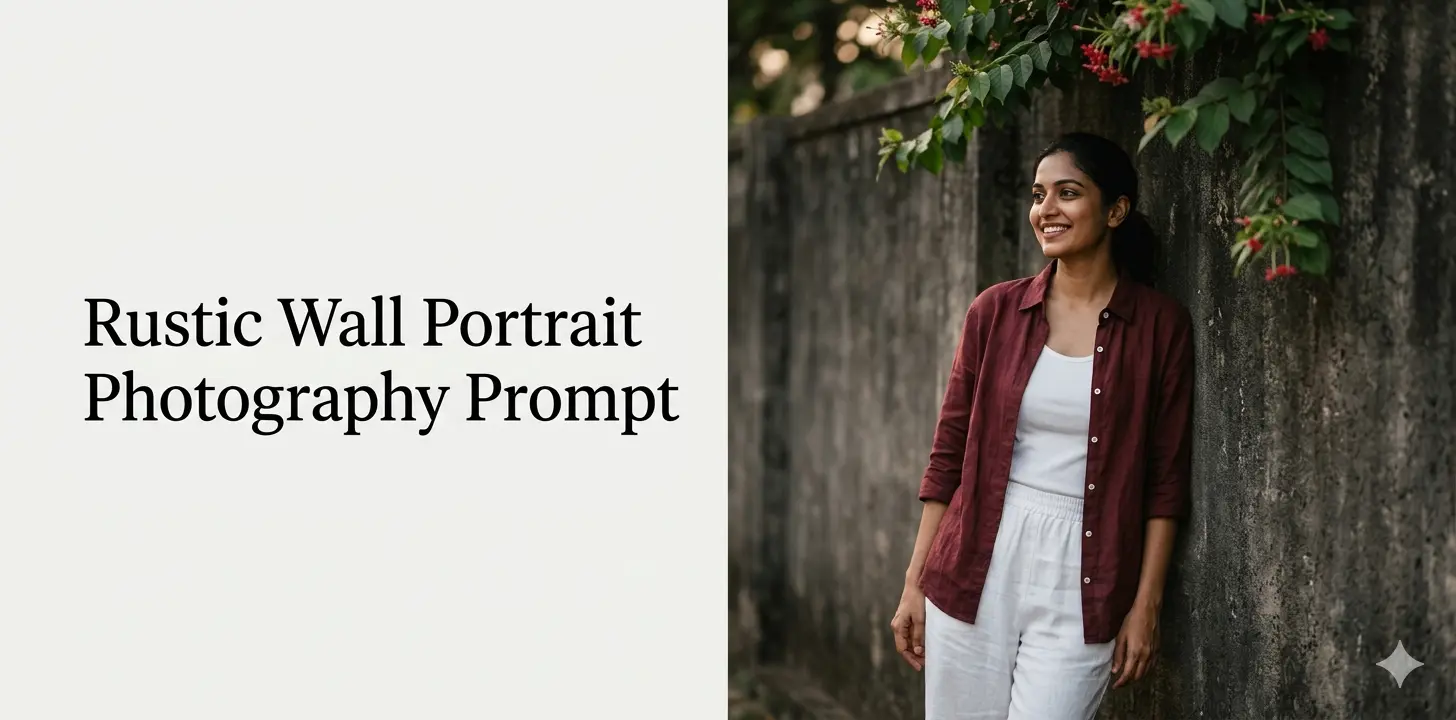
Result of a cinematic rustic wall portrait photography prompt — earthy tones, 85mm lens feel, natural light.
What Is a Rustic Wall Portrait Photography Prompt?
A rustic wall portrait photography prompt is a text instruction given to an AI image generator that directs the model to create a portrait photo featuring a textured, worn, or aged wall as the background. These walls — concrete, stone, brick, or plaster — add enormous visual depth, contrast, and character to a portrait.
The rustic wall acts as a grounding element. It roots the subject in a real, tactile world. Combined with the right lighting description and lens specification, it gives AI-generated portraits that coveted film photography feel.
💡 Quick Tip: Always mention the wall’s texture and color in your prompt. “Dark grey textured concrete wall” produces far more specific and cinematic results than just “wall background.”
Why Rustic Wall Backgrounds Work So Well in AI Portraits
Professional photographers have used rustic and urban walls as portrait backgrounds for decades. The reason is simple: a rough, muted wall creates a perfect tonal contrast with human skin, fabric texture, and hair. It does not compete with the subject — it frames them.
When you write a rustic wall portrait photography prompt for an AI tool, you are essentially giving the model the same art direction a professional photographer would give to a location scout. The AI responds to specificity. The more precisely you describe the wall, the light, the subject’s pose, and the lens, the better the output.
Key Visual Elements That Make These Prompts Powerful
According to professional portrait photography principles from B&H Photo, the background should complement, not overpower, the subject. These principles apply directly to AI prompt writing:
- Muted, earthy background tones keep focus on the face
- Texture adds depth without distracting detail
- Natural overhanging greenery softens harsh architectural lines
- Warm side lighting sculpts the face beautifully
The Anatomy of a Perfect Rustic Wall Portrait Photography Prompt
Every strong rustic wall portrait photography prompt has six core components. Master these and you will consistently generate editorial-quality AI portraits.
1. Shot Type
Define the framing first. “Medium shot,” “close-up,” or “three-quarter body shot” tells the AI exactly how much of the subject and background to show. A medium shot, for instance, captures both the person’s expression and enough of the rustic wall to feel grounded.
2. Subject Description
Be specific about the person — their expression, body language, and clothing. “Relaxed expression, looking away and smiling” communicates a mood. “Maroon linen shirt, white trousers, one hand in pocket” communicates effortless style. Gold hoop earrings and bangles add cultural texture and fine detail.
3. Background Description
This is where “rustic wall” earns its place. Describe the wall’s color, material, and any organic elements. “Dark grey textured concrete wall with overhanging green leaves and small red flowers” creates atmosphere immediately.
4. Lighting
Lighting makes or breaks a portrait. “Soft natural lighting” keeps skin tones warm and real. Avoid specifying artificial flash unless you want a harsh, editorial look. Outdoor ambient light on a cloudy day gives that soft, diffused quality that looks timeless.
5. Camera and Lens
The 85mm focal length is the gold standard for portrait photography. It compresses the background slightly, keeps the subject sharp, and flatters facial proportions. Always include “shot on 85mm lens” in your rustic wall portrait photography prompt.
6. Color Grade and Style
“Moody color grading, earthy tones, muted colors, cinematic look” — these four phrases alone will dramatically upgrade any portrait prompt. They signal to the AI that you want a film-like aesthetic, not a bright, oversaturated mobile photo.
The Complete Rustic Wall Portrait Photography Prompt (Copy-Ready)
Here is the full, tested prompt that produced the cinematic portrait you see above. You can use it directly in Midjourney, Flux, Adobe Firefly, or Ideogram:
Full Prompt
“A medium shot of a stylish Indian [Man /Woman] leaning against a rustic textured dark grey concrete wall. Overhanging from the top right are green leaves with small red flowers trailing down. The person has a relaxed expression, looking away and smiling. They are wearing an unbuttoned maroon linen shirt over a relaxed fit white trousers, one hand casually tucked in the pocket. Cinematic look, shot on 85mm lens, moody color grading, earthy tones, muted colors, soft natural lighting, high detail, photorealistic. 3:4 ratio“
Notice how every element from the six-part framework above is present. The shot type, subject, background, lighting, lens, and color grade all work together. The result is a prompt that gives the AI clear, unambiguous creative direction.
7 Rustic Wall Portrait Photography Prompt Variations to Try
Once you understand the base structure, you can create infinite variations by swapping out individual elements. Here are seven powerful variations to explore:
1. Golden Hour Street Wall Portrait
“Medium shot of a young South Asian man leaning against a weathered brick wall, golden hour side lighting, wearing a white kurta, hands in pocket, looking into the distance. Warm amber color grade, 85mm lens, cinematic, photorealistic, 3:4 ratio.”
2. Monsoon Mood — Wet Concrete Wall
“Close-up portrait of a woman standing against a dark wet concrete wall with rain streaks, overcast natural light, black turtleneck, melancholic expression, moody desaturated color grade, 85mm lens, cinematic, photorealistic.”
3. Old Haveli Stone Wall — Heritage Look
“Three-quarter shot of a woman in traditional Indian attire leaning against an aged sandstone haveli wall with peeling paint and climbing vines. Warm golden tones, soft diffused light, 85mm, editorial fashion photography, cinematic, high detail.”
4. Urban Industrial Wall Portrait
“Medium shot of a young man in a leather jacket against a rough industrial concrete wall with exposed rebar, cool grey color grade, dramatic side lighting, 85mm, photorealistic, cinematic noir look.”
5. Floral Wall — Soft Romantic Mood
“Medium shot of a woman in a white linen dress leaning against a rustic cream plaster wall, bouquet of wildflowers in hand, overhanging bougainvillea, soft golden light, warm pastel color grade, 85mm, photorealistic, cinematic.”
6. Night-Time Rustic Wall — Moody Ambient Light
“Medium shot of a man leaning against a rough dark stone wall at night, lit by warm amber streetlight glow, deep shadow and highlight contrast, moody cinematic color grade, 85mm, photorealistic, 3:4 ratio.”
7. Minimalist Portrait — White Wash Wall
“Close-up portrait of a woman against a simple whitewashed rustic wall, minimal composition, natural diffused window light, muted cool tones, clean editorial look, 85mm lens, photorealistic, cinematic.”
How to Use These Rustic Wall Portrait Photography Prompts in Midjourney
Using a rustic wall portrait photography prompt in Midjourney is straightforward. Paste the full prompt into the /imagine command, then add your preferred aspect ratio at the end. Use --ar 3:4 for portrait orientation and --v 6.1 for the most photorealistic results.
For Adobe Firefly, the same prompts work well. Firefly tends to produce more saturated results by default, so add “desaturated, muted color palette” if you want that earthy, film-like quality. You can also explore more AI photography techniques on our AI Photography Prompts category page.
Pro Tips for Better Rustic Wall Portrait Photography Prompt Results
After testing hundreds of portrait prompts, here are the refinements that consistently improve output quality:
✅ Add a reference to film stock: Phrases like “Kodak Portra 400 look” or “shot on film, grain texture” immediately give AI images a more organic, less digital feel.
✅ Specify the time of day: “Late afternoon light,” “overcast morning,” or “blue hour” dramatically changes the mood of the final image.
✅ Use negative prompts in Midjourney: Add --no harsh flash, oversaturation, blurry background, distorted hands to avoid common AI portrait mistakes.
✅ Test the gender swap: Replace “woman” with “man” and adjust clothing descriptions. The same rustic wall background works beautifully for both male and female portrait prompts.
✅ Always include “photorealistic” and “high detail”: These two terms push most AI models toward a photography-based rendering style rather than an illustration or painting look.
Explore More AI Portrait Prompt Guides on Ukip Ai
If you found this rustic wall portrait photography prompt guide useful, you will love these related posts on Ukip Ai:
- Broken Mirror Portrait Photography — Cinematic AI Prompt Guide
- Top 10 Midjourney Portrait Prompts for Photorealistic Results
- AI Photography Prompts — Full Category Archive
Ready to Generate Your Own Rustic Wall Portrait?
Copy any prompt from this guide and paste it into Midjourney, Flux, or Adobe Firefly. Experiment with the variations and make it your own. Share your results in the comments below — we would love to see what you create.
Final Thoughts
The rustic wall portrait photography prompt is one of the most versatile and visually rewarding prompt styles in AI image generation. A textured concrete or stone wall gives any portrait instant character, depth, and cinematic quality that clean studio backgrounds simply cannot match.
The key is specificity. Define your wall, your light, your lens, your subject, and your color grade — and the AI will deliver results that look like they were shot by a professional photographer on location. Use the prompts and frameworks in this guide as your starting point, and then experiment freely.
Bookmark this page, share it with your creative community, and check back regularly — we update our AI photography prompt library every week with new styles, techniques, and full walkthrough guides.
1 thought on “7 Stunning Rustic Wall Portrait Photography Prompt Ideas for Cinematic AI Images”